Settings
Everything is configured in the SETTINGS tab, spread across nine groups.
Every setting has its own help: hover over it and it tells you what it does, what happens if you change it, and, when it matters, why it comes set that way out of the box. This section is the map; the panel's help is the detail.
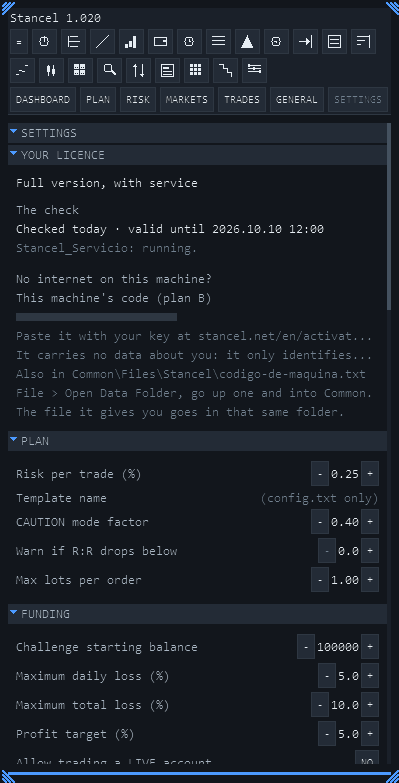
Funding — the challenge's limits
The group that matters. Without it, the guard has nothing to measure against.
| Setting | What it is |
|---|---|
| Challenge's starting balance | What it started with. Not today's |
| Maximum daily loss (%) | Your funding firm's daily limit |
| Maximum total loss (%) | The total limit |
| Profit target (%) | The phase's goal. Informational only |
| Your own daily cap (%) | Yours, tighter than the house's. Warns, doesn't close |
| Warn when less than (%) is left | Warns of closeness to the house's limit. Doesn't close either |
| Allow trading on a REAL account | The separate permission for the account with money |
| Limit the safety stop to Stancel's orders | Narrows the safety stop. Off out of the box |
| My house measures on EQUITY | How your funding firm measures the daily loss |
| The daily allowance is % of TODAY's balance | The other variant of the same thing |
| My total limit TRAILS profit | Total limit with trailing. Comes on: it brakes sooner than a fixed-limit contract would demand. If your firm has a fixed total limit — FTMO's two-step challenge, for example — turn it off; if it moves the limit up with your profits — like FTMO's one-step challenge — leave it on. Check your own rulebook: the same firm can have both (FTMO's objectives, checked in October 2026). In this version, the setting's own help names FTMO for the fixed case only |
The last three exist because every funding firm measures differently, and Stancel would rather give you the switch than assume. Check them against your own rulebook once and forget about them.
All of this is explained in The guard.
Plan — how what you draw gets sized
| Setting | What it is |
|---|---|
| Risk per trade (%) | From 0.05 to 2. Comes at 0.25 |
| CAUTION mode factor | How much it shrinks by. Comes at 0.40 |
| Warn if the R:R drops below | Your line. Comes at 0, off: at zero it never warns |
| Lot cap per order | A hard ceiling, just in case |
| Template name | Optional override of the automatic name |
| A trade has to gain at least (%) | Floor on expected profit |
Management — what Stancel does with an open position
Breakeven, trailing, the two partials and the OCO. All off out of the box, and at zero it does nothing.
It has its own section: Position management.
Telegram
Turning alerts on and choosing how much to alert (MIN, MED, MAX). The token goes in the service, not here: Telegram alerts.
Chart — how the desk looks
| Setting | What it does |
|---|---|
| Desk theme | The colours |
| Panel density | How tightly the information is packed |
| Flash when a figure changes | The blink on the figure that just moved |
| Status bar on charts | The essentials, without the panel open |
| Draw the DKL/RKL on the chart | The reference levels |
| TradingView-style axis navigation | Another way of moving around the chart |
If you're short on screen space, density is the first thing worth touching.
And turning the flashes off leaves the panel completely still — and along the way it stops needing the fast timer, so it costs nothing either.
Indicators
What gets calculated and with what parameters: RSI, Bollinger, Keltner, Donchian, triple EMA, ADR, and the candle type they run on.
Heikin-Ashi smooths and keeps the clock, so the session range keeps working.
Renko and range bars are built, just off out of the box. The “Renko brick in points” setting (Indicators group) comes at 0, and at zero the series isn't built on purpose: an invented default — “why not 100” — would give a Renko nobody chose, drawn with the same authority as one you thought about. Set it and it builds; while it's at 0, the indicators are left with no data and the panel says so — it does not fall back to time candles, because thinking you're looking at Renko when you're looking at time is worse than not having Renko.
News
From MetaTrader's economic calendar: the minimum importance, whether to show only the chart's pair, and how much advance notice to give.
General
The desk's language (Spanish and English) and the daily-notice behaviour.
Account type
What Stancel knows about the account it's on: whether it's demo or real, and how to treat it.
Where everything is saved
In a file inside MQL5\Files\, in a folder named after the product. It's created on its own the first time.
It's plain text: it can be copied from one computer to another, and it can be backed up.
If you ever open two instances of Stancel at once, the second one could write over the first one's settings. It's a known and fixed bug, but it's still worth having a copy of the file if you've put time into tuning it.