The guard: what actually protects you
This is the important section of the manual. Everything else about Stancel can be replaced with patience and a calculator; this can't, because it acts on the day you're not watching.
It's worth reading in full, once.
What it does, in one sentence
Stancel knows your challenge's starting balance and its limits. With that it measures, on every tick, how much room you have left, warns you when you're getting close, and closes everything if you cross it.
The three figures it watches
| What it is | Where you set it | What happens when it trips | |
|---|---|---|---|
| Daily loss | Your funding firm's limit for one day | SETTINGS → Funding | Closes |
| Total loss | The limit for the whole account | SETTINGS → Funding | Closes |
| Your own cap | Yours, tighter than the house's | SETTINGS → Funding | Warns |
The first two belong to your funding firm and you copy them from their rulebook. The third is yours, and it's optional.
🔴 CORRECTED. Until 2026-08-27 your own cap also closed positions, just like the house's two limits. This was changed on purpose: the house's limits are challenge survival, and your own cap is personal discipline — a guard that treats the two the same turns a preference into a rule, and someone else's rule at that, in a product that's sold. Today it warns and closes nothing.
Why you'd want a tighter cap than the house's
Because the house's limit is the point at which you've lost the challenge. A warning right there leaves no time to react.
A own cap set lower — say 2% when the house allows 5% — warns you with plenty of margin to spare. And the margin matters for a specific reason: the problem is almost never one trade, it's having several at once. Three positions running together turn 2% into 5% in the time it takes you to check the screen.
⚠️ Mind the difference. There are two settings that look similar, and neither of them closes anything:
- "Your own daily cap (%)" — warns when you cross your own threshold, the one you chose.
- "Warn when less than (%) of the daily allowance is left" — warns when you're getting close to the HOUSE's limit, the one that actually matters.
Both are in Funding, both warn and neither closes, and the panel tells you which one tripped. The only things that close are the house's two limits, in the table above.
What exactly happens when it trips
It closes everything on the account. Everything: what Stancel opened and what you opened by hand.
This deliberately breaks the program's general rule — Stancel doesn't touch what isn't its own — and it's worth understanding why:
The drawdown belongs to the ACCOUNT, not to Stancel's orders. A position you opened by hand counts towards exactly the same percentage the funding firm watches. A safety stop that leaves it open hasn't stopped anything: it's left exactly the thing that keeps losing running.
If you genuinely prefer the opposite, there's a setting — "Limit the safety stop to Stancel's orders" — that narrows it. It comes off by default, and it's off on purpose: the factory value has to be the one that protects you.
In the free version the safety stop is narrower, without you touching anything. With no licence it only acts on what Stancel opened: what you opened by hand it warns about, it does not close it (the panel says so: “FREE VERSION BRAKE: only closes what Stancel opened”). And Stancel's pending orders are cancelled, because there can be none in the free version: they would open through the back door when price arrived. What Stancel already had open keeps its safety stop even if the licence lapses.
And when you turn it on, the panel says so. A safety stop quietly narrowed is worse than no safety stop: it gets flipped one day, forgotten, and stops things halfway without anyone knowing.
What does NOT trip the safety stop
Here's the part almost nobody designs well, and the one that prevents the silliest disaster of all.
The guard can answer "can't trade" for reasons that are not a loss:
| Reason | What the safety stop does |
|---|---|
| Daily limit reached | Closes |
| Total limit reached | Closes |
| No account data yet | Stays still |
| The account is real and you haven't authorised it | Stays still |
(Your own cap isn't in this table because it doesn't play this game: it never closes or blocks anything, it only warns — see the section above.)
The last two are "I don't know" and "I won't let you in", not "you've lost".
If the safety stop fired on "no data", it would close the whole account on every startup, two seconds before the terminal finishes connecting — because until that moment there's neither equity nor account type, and the guard answers "I don't know", which for it counts as a no.
That's why the trigger is written naming loss reasons one by one. A new reason added in the future closes nothing until someone decides it should, explicitly.
It doesn't ask permission to stop
The safety stop does not need the desk to be armed, and does not ask for confirmation.
This is deliberate, and it comes down to one rule: getting out is always possible; getting in, not always. A safety stop that asks permission to stop isn't a safety stop.
When it rearms
At midnight, with the account's day change. The daily limit starts again; the total does not, because the total never resets.
How to know it's watching you
On the DASHBOARD tab, at the top, there are three spheres:
- TODAY — how much of the daily allowance you've used
- TOTAL — how much of the total limit you've used
- TARGET — how far you are from clearing the challenge
And below, a sentence in words: "5,000 left today and 9,885 to the limit".
That sentence is your check. If it shows numbers, the guard is measuring. If it says it has no data, go back to First steps: the starting balance is missing.
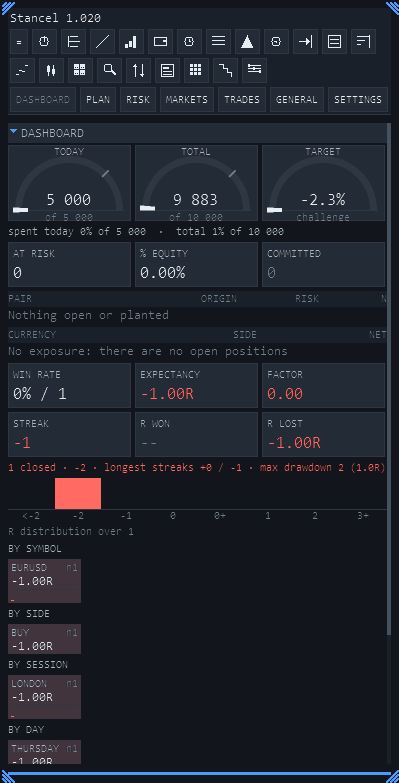
At the very top, the three spheres. Below, in words: "today spent 0% of 5,000 · total 1% of 10,000". That sentence is the check.
The target doesn't block anything
When you reach the profit target, Stancel tells you and does nothing else.
It doesn't stop you, doesn't close your positions and doesn't force you to stop. The funding firm doesn't either, and this guard exists to prevent disasters, not to supervise you.
What the guard cannot know
- It doesn't read your funding firm's rules. Every one has its own, some measure against balance and others against equity, and some change between phases. That's why there are settings for both ways of measuring instead of a guess.
- It doesn't know whether you're in phase 1 or phase 2. You enter the figures yourself.
- It doesn't know the rules that aren't about money — minimum days, consistency, a ban on trading news. That's on you.
What it does do, it does on every tick, without getting tired. Which is exactly the opposite of you at eleven at night.