Your licence
Stancel works with no licence from the very first second, in the free version: it reads and measures everything, and it doesn't open new positions. Closing, modifying and the guard keep working at all times; so does the safety stop, but with no licence it only closes what Stancel opened (see The guard). The licence turns on the rest: the 30-day trial, or the full version.
With no key, Stancel does not connect to anything. What it knows about your licence, it reads from a file, licencia.txt, which you download from the website. With a key set in the EA properties (F7 › Licence), it also checks its permission at api.stancel.net: what travels is under “What travels when you activate”, below.
Activating it, in three steps
If you would rather not copy anything: put your key (
STC-…) in the EA properties (F7 › Licence) and Stancel checks it itself. The file below is plan B, for a machine with no internet.
1 · Copy your machine's code
In Stancel, open SETTINGS and find the YOUR LICENCE section. There is this machine's code: it starts with MAQ- and looks like this, MAQ-W-XXXXX-XXXXX-XXXXX.
It's also written in the file codigo-de-maquina.txt, in the folder from step 3: you can open it and copy it from there.
2 · Paste it on the website, with your key
Go to stancel.net/en/activate.html and paste:
- your key, which arrived by email when you requested the trial or bought the licence (starts with
STC-); - the machine code from step 1.
Click ACTIVATE AND DOWNLOAD. licencia.txt is downloaded.
If you mix up the fields, the page tells you: the two start in a similar way, and it's the most common mistake.
3 · Put the file in its folder
In MetaTrader: File → Open Data Folder. Go up one level and into Common → Files → Stancel. Put licencia.txt there, with that exact name; if one was already there, replace it.
Stancel reads it on its own: the YOUR LICENCE section switches to "Trial" or "Full version".
When you need to download it again
Because the desk doesn't need to connect to anything, it learns about changes to your licence through this file. Every time something changes, go back to the page with the same key and the same code: an up-to-date file comes out and it does not use up another activation, because it's the same machine.
If you have Stancel_Servicio running, this already happens on its own — see the online check, below. This table is the manual path: for when the service isn't running, or when you don't want to wait for the next automatic check.
| What happened | What to do |
|---|---|
| You bought the full version | Download it again and replace the trial one |
| I granted you the extra 15 trial days | Download it again |
| You renewed your year of service | Download it again |
You lost licencia.txt | Download it again: the same one comes out |
You reinstalled Windows, or deleted the Common → Files → Stancel folder | The machine code changes, and the website would count it as another computer. Write to hola@stancel.net and we'll release the old one |
The online check, on top of the file
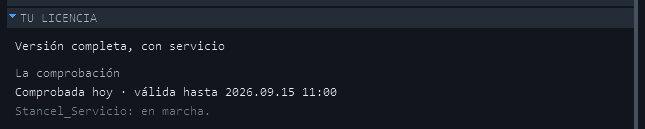
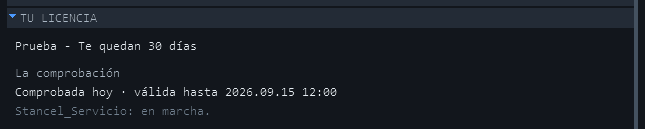
In SETTINGS → YOUR LICENCE there's a separate block, "The check." It doesn't replace anything above — it's an optional layer that, when it's available, saves you having to go back to the website every time.
While Stancel_Servicio is running, it talks to our server every few hours and, if something's changed — you bought, you got extra days, you renewed — it updates your licence on its own, with nothing to download.
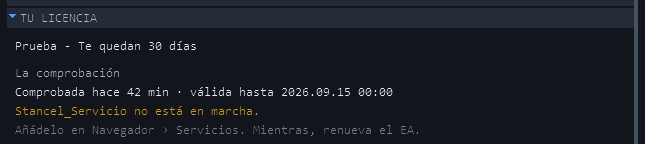
If the service isn't running
The desk itself does the same check as a fallback, so you're not left without one. But it's worth keeping the service on: it checks more often, and it doesn't depend on having a chart open.
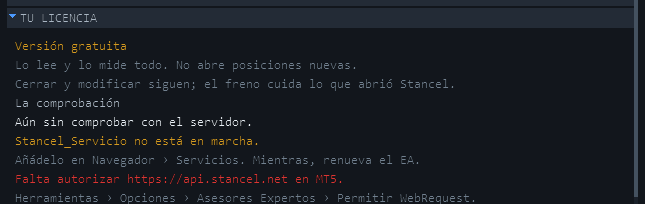
If MetaTrader doesn't have the address allowed
A clear message comes up, with the fix inside it:
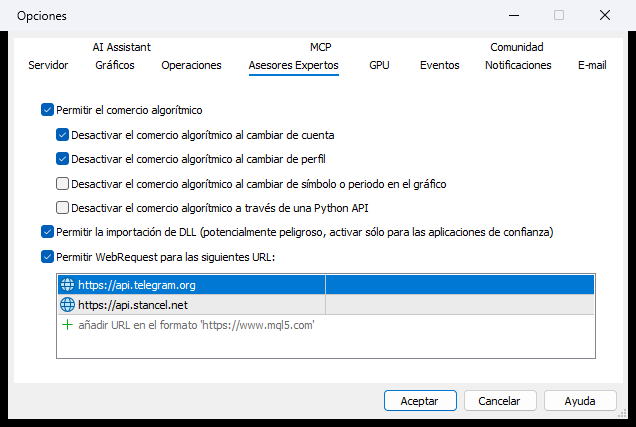
It's the same permission — Tools → Options → Expert Advisors → Allow WebRequest — you already granted for Telegram, if you use it, just with another address on the list:
And this takes nothing away from the file
If the check fails — no connection, service stopped, address not allowed — the licence you already have keeps working exactly the same. A brief outage doesn't leave you without a licence: the service retries on its own every few hours, and what's already saved holds for several days without needing any renewal.
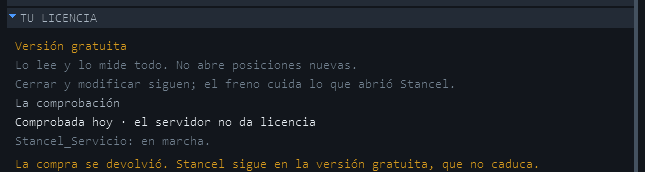
And if there genuinely is no licence left to give — the purchase was refunded, the key was revoked, the trial ran out — the server says so with its exact reason, and Stancel drops to the free version without breaking anything: it keeps reading, measuring and closing what was already open. It never just goes dark.
Two machines per key
One key covers two computers at a time — your desktop and your laptop, for instance. You don't need to buy two.
The key is tied to the machine, not to your account: you can switch account, broker or challenge without touching anything.
If you change computer and both slots are already taken
Write to hola@stancel.net and we'll release the one you no longer use. And here's what you'll run into, said up front so it isn't a surprise exactly when you're in a hurry:
There's a 30-day wait between one release and the next. It's there to stop a key rotating from computer to computer, and it's the only thing keeping one licence from being shared between several people.
And if you have a reason, we lift it. A machine that broke, a stolen laptop or a reinstall that went wrong aren't rotation: write and tell us, and we'll unstick you by hand without waiting the month.
Copying licencia.txt to another computer doesn't work: the file carries this machine's code inside it, and it's signed so it can't be changed.
Don't delete
maquina.txt. It's in the same folder aslicencia.txtand it's this computer's identity: that's where the code comes from. If it disappears, Stancel builds itself another one and the code changes — and your licence stops recognising this machine until we release it.
What travels when you activate
When you activate on the website: your key and the machine code. And if a key is set in the EA, the permission check sends four fields and nothing else — the server rejects any other —: your key, the machine code, the Stancel version and the trial days. Never your trades, your balance, or your account.