What Stancel is
Stancel is a desk for MetaTrader 5 built for one specific situation: you're in the middle of a funded-trader challenge and you can't afford a bad day.
It is not a robot. It does not look for entries for you and it does not trade on its own. What it does is more boring and more useful: it shows you at a glance where you stand, calculates position size for the risk you have decided, and watches that you don't cross the challenge's limits even if you're not paying attention.
The problem it solves
A funded-trader challenge is rarely lost on one bad entry. It's lost on a bad day where three things stack up: a trade that goes wrong, a bigger one to make it back, and the daily loss limit crossed without anyone checking.
MetaTrader doesn't warn you about any of that. It shows you floating profit and little else: it doesn't know your challenge's starting balance, your daily limit, or how much room you have left before the funding firm closes your account.
Stancel does know, because you tell it once and from then on it watches it on every tick.
The three things it does, in order of importance
1 · It stops you before they stop you
You enter the challenge's starting balance and its two limits — daily and total — and Stancel constantly calculates how much room you have left. If you get close, it warns you. If you cross it, it closes.
This is the most valuable thing it does, and what justifies everything else: it's the only part that acts on the day you're not watching.
And it works even if everything else fails. With no internet and with no dependency on any outside service, the guard keeps watching and closing. It's built this way on purpose: a lock that stops you from closing a position is a lock that ruins someone.
2 · It sizes the position for you, and won't let you overshoot
You state how much you want to risk as a percentage, where the stop goes, and Stancel calculates the lots. No mental arithmetic, no phone calculator at three in the afternoon.
And if the result goes beyond what your risk allows, it doesn't round it up: it tells you.
3 · It shows you where you stand
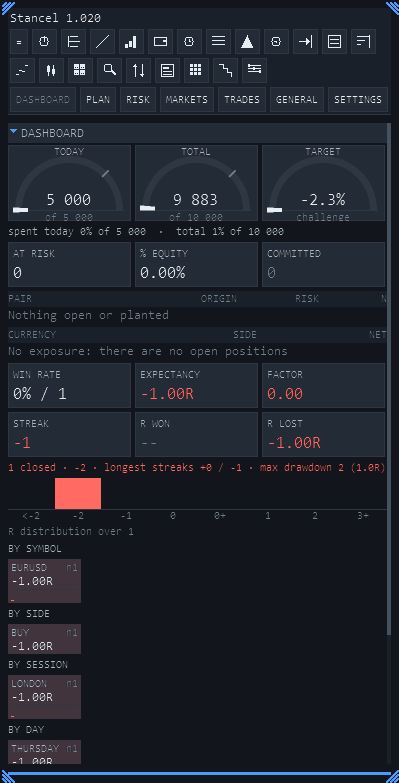
Seven tabs with what you need to decide: the state of the challenge, the plan you've set on the chart, your real exposure, the day's session and news, your positions, your history and the settings.
All in one panel inside MetaTrader, with no extra windows and without leaving the chart.
What Stancel is NOT, said up front
- It doesn't decide for you. It gives no "buy now" orders. It has a SCANNER that shows which strategy is forming on each pair and timeframe, sorted by how close it is to firing — but that is what it sees, not an order: the decision and the order are yours. Its seal says how much evidence there is behind it: today, none measured by us.
- It doesn't trade on its own. Every order is sent by you, in three deliberate gestures.
- It doesn't promise results. Not yours, not anyone's. A panel doesn't make money: it stops you losing it through carelessness, which is a different thing.
- It doesn't send your data anywhere on its own. Your trades, your balance and your account never leave your computer. Little goes out, and you turn it on yourself: Telegram alerts, if you enable them, go to your own bot with the token you set (off out of the box, and turning it off silences it again); and if you set a licence key, the permission check sends
api.stancel.netthe key, the machine code, the version and the trial days. With no key and no Telegram, it connects to nothing.
What you need to use it
| MetaTrader 5 | Any recent build. Does not work in MetaTrader 4 |
| An account | Demo or real, with any broker |
| Windows | It's where MetaTrader 5 desktop runs |
| Nothing else | No DLLs, no installer, no admin rights and no account anywhere |
Where to go next
If you've just downloaded it, go to Installing. If it's already set up and you want it protecting you straight away, go directly to First steps: there are two figures you need to set, and without them the guard has nothing to measure against.